
Odoo Multi-Company Management: Complete Guide to Managing Multiple Businesses
Category: ERP · Suggested URL: odoo-multi-company-management-guide-managing-multiple-businesses
Introduction
Managing multiple businesses, subsidiaries, branches, or legal entities can become complicated when each company operates with separate accounting records, inventory, sales operations, employees, and financial processes.
Businesses often struggle with duplicated data, inconsistent reporting, intercompany transactions, and limited visibility across their organizations.
This is where Odoo Multi-Company Management becomes valuable.
Odoo provides a centralized ERP environment that allows organizations to manage multiple legal entities within a single database while maintaining company-specific operations, financial records, access permissions, and reporting structures.
Whether you operate multiple subsidiaries, international branches, manufacturing units, or different business divisions, Odoo helps simplify business management while maintaining the necessary separation between companies.
In this guide, we will explore how Odoo Multi-Company Management works, its key features, configuration process, practical business use cases, and best practices.
1. What Is Multi-Company Management in Odoo?
Odoo Multi-Company Management is a functionality that allows businesses to configure and manage multiple companies within one Odoo database.
Instead of maintaining separate ERP systems for every legal entity, organizations can manage their companies through a shared platform.
For example, consider a business group operating three companies:
Company A: Manufacturing operations.
Company B: Wholesale distribution.
Company C: Retail and eCommerce operations.
Each company can maintain its own:
Accounting records and financial journals.
Sales and purchase transactions.
Warehouses and inventory operations.
Customers and suppliers.
Company-specific configurations.
Taxes, currencies, and fiscal positions.
Users and access permissions.
At the same time, authorized users can switch between companies and access consolidated business information where appropriate.
This creates a centralized management environment without requiring every company to operate independently on a separate ERP database.
2. Key Features of Odoo Multi-Company Management
Odoo provides several capabilities that help organizations manage multiple legal entities efficiently.
A. Centralized Company Management
Administrators can create multiple companies from the Odoo database and configure each company independently.
Each company can have its own company name, address, logo, currency, tax identification details, and accounting configuration.
This makes it easier to manage different legal entities through one centralized ERP platform.
B. Company-Specific Accounting
Financial transactions can be recorded separately for each company.
For example:
Company A maintains its own customer invoices.
Company B manages its own vendor bills.
Company C records its own expenses and payments.
This helps maintain separate financial records and supports company-specific financial reporting.
C. Shared and Company-Specific Contacts
Odoo supports both shared and company-specific records.
For example, a supplier may serve multiple companies within the same business group.
Instead of creating duplicate supplier records unnecessarily, organizations can configure shared contacts where appropriate.
Company-specific records can also be maintained when business requirements demand separation.
D. Multi-Warehouse and Inventory Management
Organizations can configure separate warehouses and stock locations for different companies.
For example:
Company | Warehouse | Operation |
|---|---|---|
Company A | Manufacturing Warehouse | Raw materials and production |
Company B | Distribution Warehouse | Wholesale inventory |
Company C | Retail Warehouse | Retail stock |
This allows businesses to organize inventory operations according to their company structure.
E. User Access and Company Permissions
Odoo allows administrators to assign users access to specific companies.
For example:
A finance manager can access Company A and Company B.
A warehouse manager can access only Company B.
A group administrator can access all companies.
This helps maintain operational control and reduces unnecessary access to confidential business information.
3. How to Configure Multi-Company Management in Odoo
Setting up multi-company functionality requires proper configuration of companies, users, accounting, and operational workflows.
Let's understand the configuration process.
Step 1: Activate Multi-Company Functionality
First, open the Odoo database and navigate to:
Settings → Users & Companies → Companies
From here, administrators can create and manage multiple companies.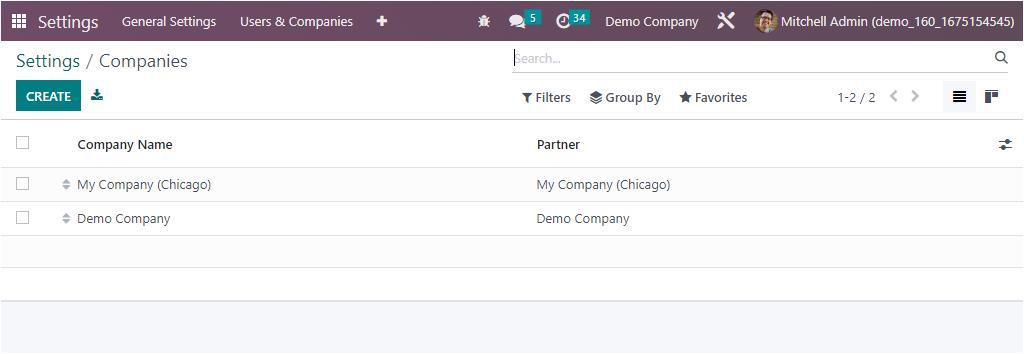
Step 2: Create Multiple Companies
Click the New button and enter the required company information.
Typical configuration fields include:
Company Name
Address
Country
Tax ID
Currency
Company Logo
Contact Information
For example:
Field | Company A | Company B |
|---|---|---|
Company Name | Harbor Manufacturing | Harbor Distribution |
Country | United States | United States |
Currency | USD | USD |
Business Type | Manufacturing | Distribution |
Save the configuration and repeat the process for additional companies.
Step 3: Configure User Access
Navigate to:
Settings → Users & Companies → Users
Open the relevant user and configure:
Allowed Companies
Default Company
Application Access Rights
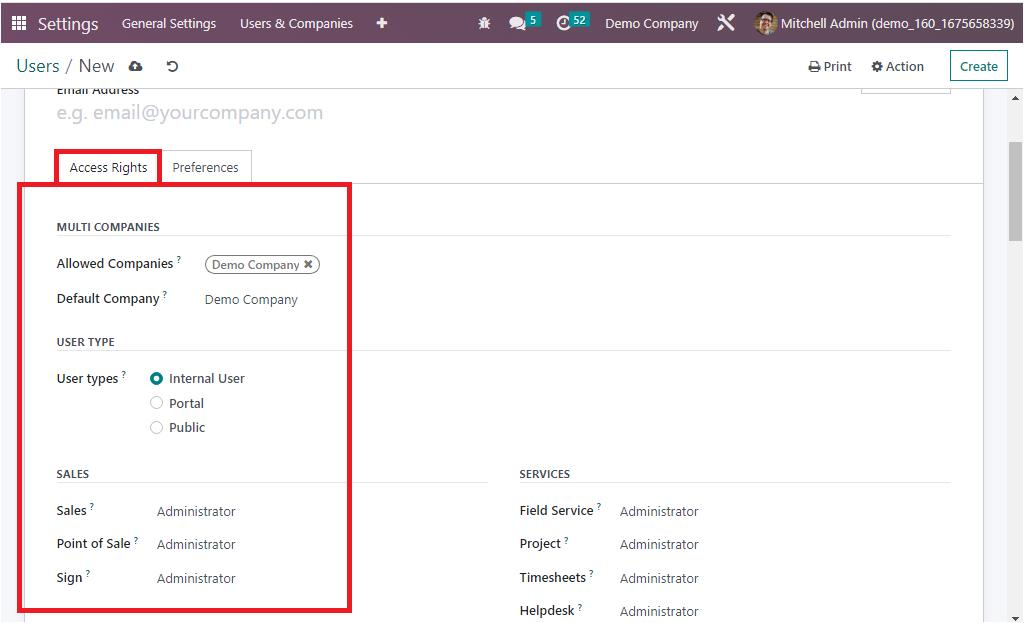
The Allowed Companies field determines which companies the user can access.
The Default Company determines which company is selected when the user logs in.
It is important to configure these permissions carefully to prevent unauthorized access to company information.
Step 4: Configure Accounting Separately
Each company should have its own accounting configuration according to its legal and financial requirements.
Important configurations include:
Chart of Accounts
Journals
Taxes
Fiscal Positions
Bank Accounts
Payment Methods
Financial Reports
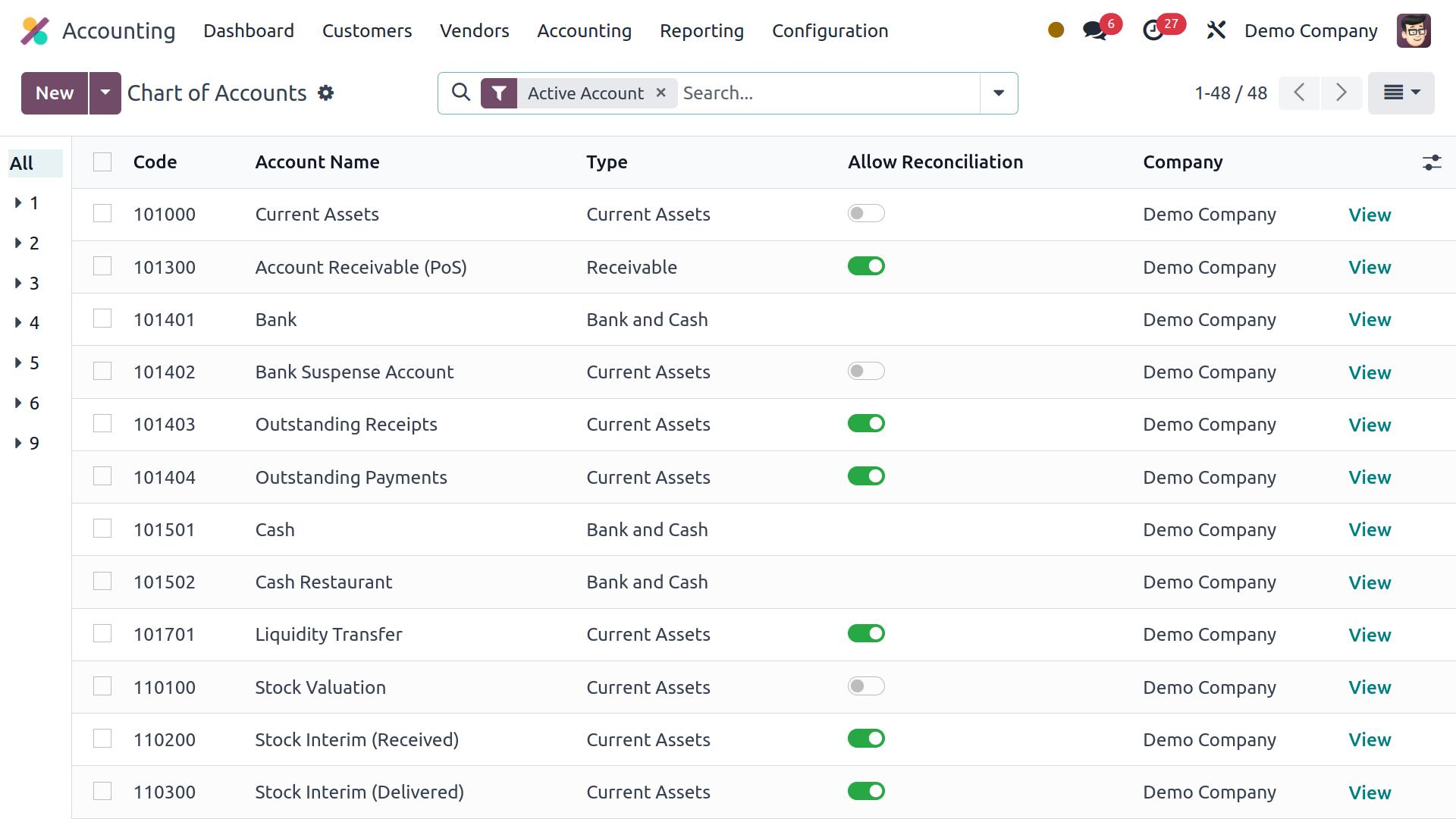
Proper accounting configuration helps ensure that financial transactions are recorded under the correct legal entity.
Step 5: Configure Warehouses and Inventory
Navigate to:
Inventory → Configuration → Warehouses
Create warehouses and assign them to the appropriate companies.
For example:
Warehouse | Assigned Company |
|---|---|
Manufacturing WH | Harbor Manufacturing |
Distribution WH | Harbor Distribution |
Retail WH | Harbor Retail |
This helps maintain organized stock operations across different business entities.
Step 6: Test Company Switching
Once the configuration is complete, users can switch between their permitted companies using the company selector in the Odoo interface.
Multi-company — Odoo 19.0 documentationodoo.com
Test the following:
Company-specific sales orders.
Customer invoices.
Purchase orders.
Inventory transfers.
Financial reports.
User access permissions.
This ensures that each company operates according to the configured business rules.
4. Understanding Intercompany Transactions in Odoo
One of the most valuable capabilities for multi-company businesses is the ability to manage transactions between companies.
Consider this example:
Harbor Manufacturing produces electronic products, while Harbor Distribution purchases and sells those products.
The business process may look like this:
Harbor Manufacturing
Manufactures electronic products
Intercompany Sales Order
Products supplied to another company
Harbor Distribution
Purchases, stores and sells products
Depending on the Odoo version and configuration, intercompany automation can generate corresponding transactions such as:
Sales orders.
Purchase orders.
Customer invoices.
Vendor bills.
The companies must have the appropriate company relationships, configurations, and intercompany rules.
Important: Intercompany automation does not automatically handle every accounting, tax, or legal requirement. Businesses should validate the complete workflow, including intercompany reconciliation and applicable transfer-pricing policies.
5. Shared Data vs Company-Specific Data
Understanding data sharing is essential when implementing multi-company functionality.
Not every record should be shared across all companies.
Data | Typical Configuration |
|---|---|
Products | Shared or company-specific |
Customers | Shared or company-specific |
Vendors | Shared or company-specific |
Chart of Accounts | Company-specific |
Accounting Journals | Company-specific |
Warehouses | Company-specific |
Sales Orders | Company-specific |
Purchase Orders | Company-specific |
Taxes | Company-specific |
Employees | Depends on configuration and business requirements |
Choosing the correct configuration prevents data inconsistencies and operational problems.
6. Real-World Business Use Cases
Odoo Multi-Company Management is useful for businesses operating across different industries.
Manufacturing Groups
A manufacturing group can manage multiple production companies, warehouses, purchasing operations, and financial records from one ERP platform.
Wholesale and Distribution Businesses
Companies operating across different regions can manage separate sales operations, inventory, and customer transactions.
International Business Groups
Organizations operating in multiple countries can configure different currencies, taxes, fiscal positions, and financial records according to local requirements.
Retail and eCommerce Groups
Businesses with multiple retail companies can manage separate company operations while using centralized product and customer information where appropriate.
Holding Companies
Parent organizations can manage subsidiaries and obtain group-level financial visibility through appropriate reporting and consolidation processes.
7. Common Challenges in Multi-Company Implementation
Although Odoo provides powerful multi-company capabilities, incorrect configuration can create operational challenges.
Here are some common issues businesses should consider.
1. Incorrect User Permissions
Users may accidentally access company information they should not be able to see.
Solution: Configure Allowed Companies and access rights carefully, and test access using representative user accounts.
2. Accounting Configuration Errors
Different companies may require separate charts of accounts, taxes, journals, and financial reporting.
Solution: Establish a company-wise accounting configuration before processing live transactions.
3. Incorrect Shared Data Configuration
Sharing records unnecessarily can create confusion between companies.
Solution: Identify which records should be shared and which should remain company-specific.
4. Intercompany Reconciliation Problems
Transactions between companies may create differences in receivables, payables, and financial balances.
Solution: Establish consistent intercompany transaction and reconciliation procedures.
5. Inventory and Warehouse Confusion
Incorrect warehouse or company assignments can affect stock visibility and inventory operations.
Solution: Configure warehouse ownership and company-specific routes carefully.
8. Best Practices for Managing Multiple Companies in Odoo
For a successful multi-company implementation, businesses should follow these practices:
Define the legal and operational structure before creating companies.
Configure separate accounting records for each legal entity.
Establish clear rules for shared and company-specific data.
Assign users only the company permissions they require.
Configure intercompany transactions according to business requirements.
Validate warehouse and inventory ownership.
Test financial transactions across all companies.
Establish a regular intercompany reconciliation process.
Review access permissions periodically.
Maintain proper backups and database security.
A structured implementation approach helps organizations reduce errors and maintain better control over their business operations.
9. Why Choose ERP Harbor for Odoo Multi-Company Implementation?
Implementing multi-company functionality requires more than simply creating multiple companies in an ERP database.
Businesses need a properly designed architecture that considers accounting, inventory, user permissions, intercompany transactions, reporting, and operational requirements.
ERP Harbor Consulting Services helps businesses design, implement, customize, and optimize Odoo ERP according to their organizational structure.
Our Odoo services include:
Odoo Multi-Company Implementation
Intercompany Workflow Configuration
Accounting and Financial Configuration
Multi-Warehouse Management
Odoo Customization and Development
Third-Party Integrations
Odoo Migration and Upgrade
Ongoing Odoo Support and Maintenance
With 14+ years of Odoo experience, official Odoo partnership, and experience across 50+ industries and 25+ countries, ERP Harbor helps businesses build scalable ERP solutions.
Whether you are managing two companies or a growing group of subsidiaries, our team can help you establish an efficient and reliable Odoo environment.
Conclusion
Odoo Multi-Company Management provides organizations with a centralized way to manage multiple legal entities while maintaining separate financial and operational records.
From company-specific accounting and inventory to user permissions and intercompany transactions, Odoo offers the flexibility needed to support growing business groups.
However, successful implementation depends on proper planning, configuration, testing, and ongoing maintenance.
With the right implementation strategy, businesses can simplify operations, improve financial visibility, and build a scalable ERP environment.
Looking to manage multiple businesses through one Odoo ERP system?
Contact ERP Harbor Consulting Services to discuss your multi-company requirements.
Transform Your Business with Odoo ERP
ERP Harbor Consulting Services
Odoo Ready Partner | 14+ Years of Odoo Experience
contact@erpharbor.com
+91 9106997061